“Roboto is the first place we go when one of our robots has an issue. It has significantly reduced the time and cost required for our team to investigate failures and identify root causes.”
Aaron Roller, Head of Software Infrastructure & Reliability · ANYbotics
“Roboto makes it easy to diagnose issues on a single dataset or zoom out to aggregated metrics.”
Robotics teams are drowning in data. Roboto surfaces what matters, automatically.
Automate your analysis
Manual replay tools don't scale as data grows. Create workflows to analyze logs automatically.
Search for patterns
Find critical events, anomalies and edge cases hiding in your robotics data.
Curate new datasets
Turn multimodal robotics logs into structured datasets for training and evaluation.
Track your reliability
Create custom metrics to track performance across your fleet as you scale.
Platform
Go from raw logs to root cause.
Roboto finds problems before your customers do.
Ingest
Read every robotics format. Ingest your logs and get back indexed datasets ready for querying, all through a single Python SDK.
Analyze
Process your raw data into metrics. Use Actions and Triggers to automate your workflows and aggregate fleet-level KPIs.
AI Summary
A PX4-based drone operated in Lingfield, England, starting at 2025-08-21T10:35:48Z. The flight lasted approximately 132 seconds, with the vehicle experiencing significant sensor and estimation challenges. The drone was equipped with a CubePilot CubeOrange flight controller running PX4 firmware.
Key Events
High Vibration Levels : Mean vibration of 16.58 m/s², max of 40.42 m/s², indicating potential stability and sensor accuracy issues.
GPS Jamming : GPS jamming indicator elevated, with mean of 52.19 (threshold is 40), suggesting potential signal interference.
GPS Position Accuracy Issues : Horizontal position accuracy exceeded recommended threshold, with a mean of 3.46 meters.
Estimator Faults : Bad vertical accelerometer data detected across multiple estimator instances, potentially affecting estimation accuracy.
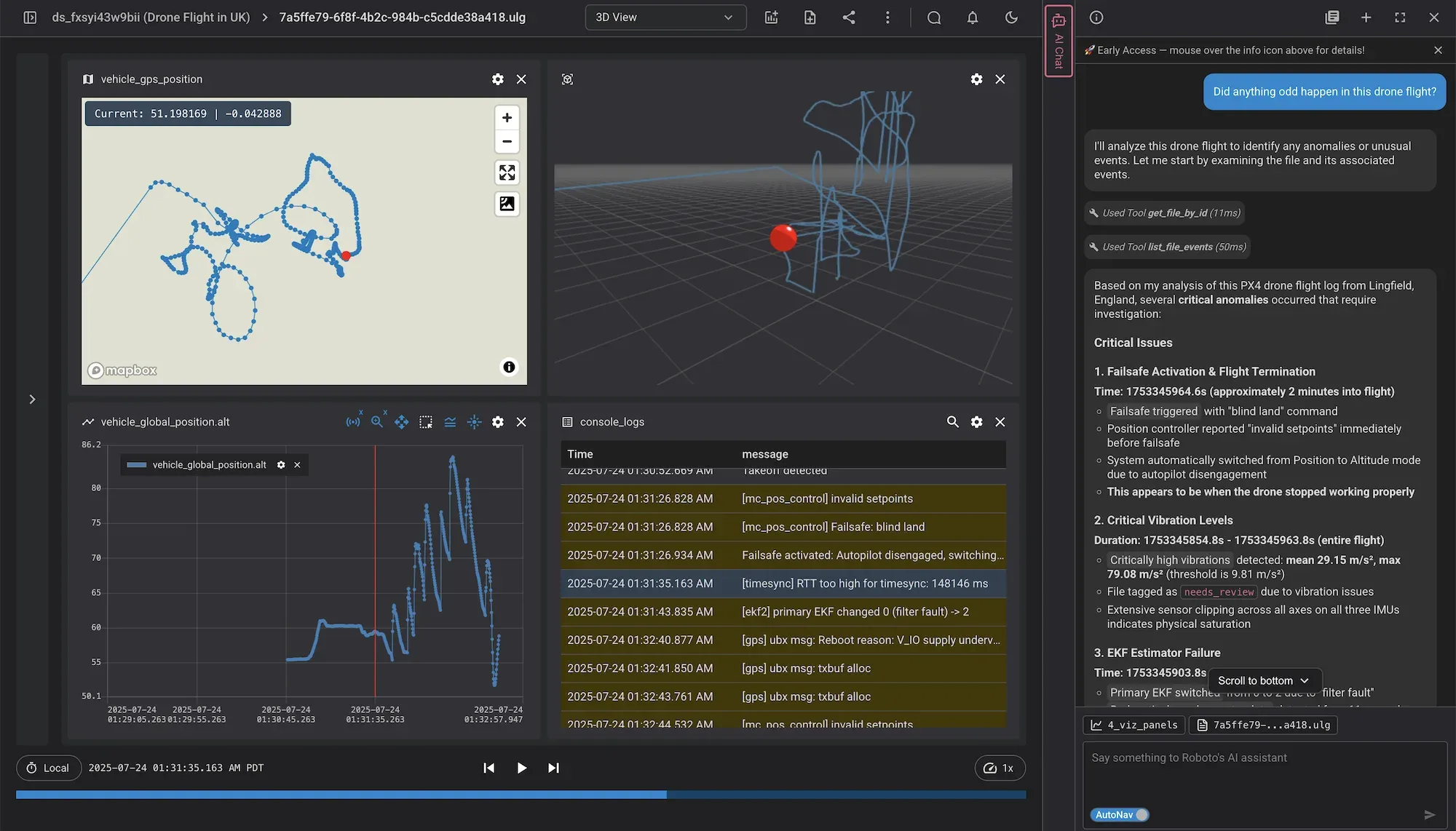
Did anything odd happen in this drone flight?
I'll analyze this drone flight to identify any anomalous events. Let me start by gathering information about the file and its events.
Yes, several critical anomalies occurred during this drone flight. Here's a summary of the key issues:
Roboto analyzes every flight so your team catches issues before customers do, and builds the FAA Part 108 audit trail. Whether you fly for public safety, delivery, or defense.
Ingest every drone format
Support for PX4, Ardupilot, ROS, CSV, JSON, Parquet, system logs and your team's custom formats.
Search your entire flight archive
Slice through thousands of flights by hardware configuration, software version, or mission events. Zero downloads required.
Catch the issues you don't want to miss
Surface issues and anomalies like vibration spikes, GPS jamming, magnetometer drift, sensor clipping, and failsafe activation.
Automated QA on every unit
Battery health, sensor fusion, GPS, motor performance. Catch issues at the factory, not in the field.
We can preemptively find complex hardware and software issues across our fleet before they become a problem for our customers. Automated analysis has enabled us to scale faster and deliver best-in-class reliability.
Jon Hoff
Autonomy Engineer, BRINC
99.5%
of the fleet kept flying during a critical hardware investigation
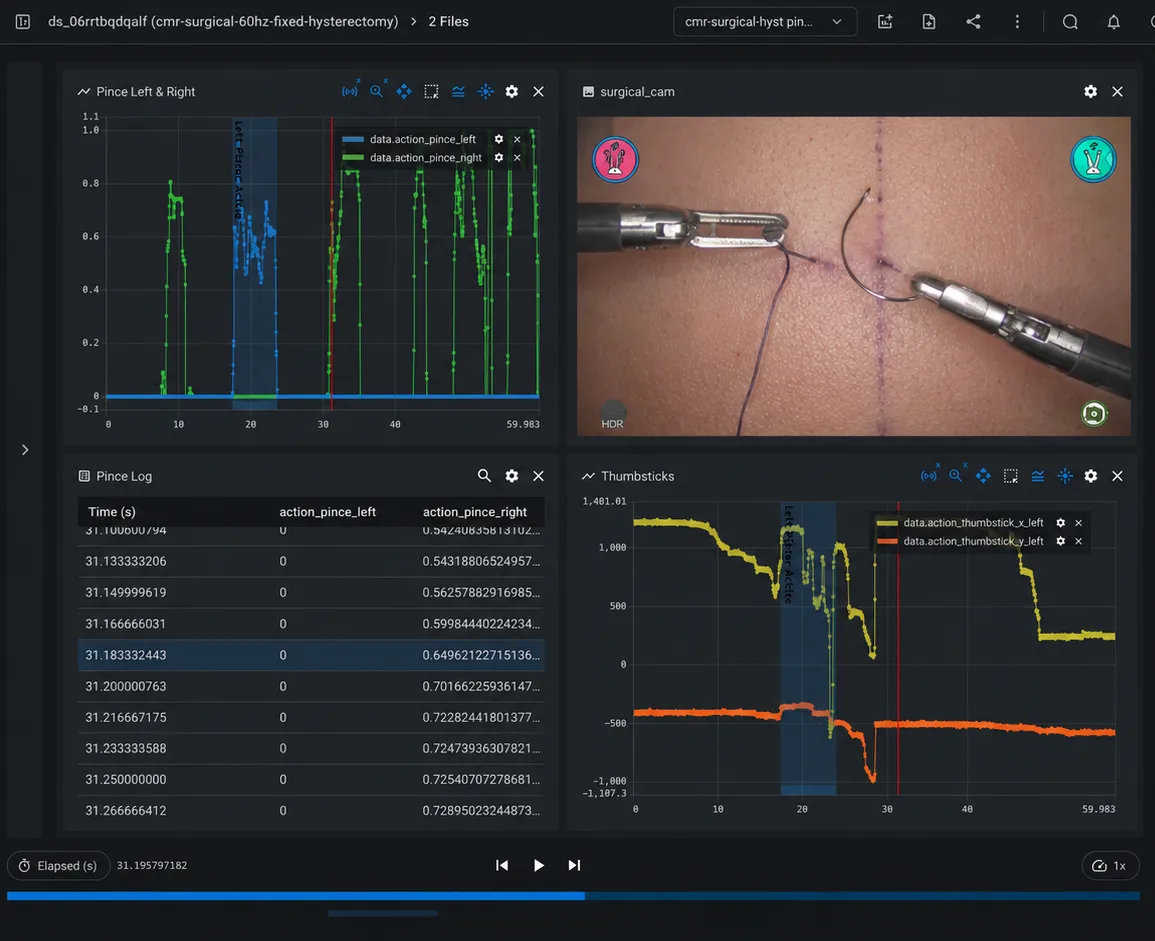
Roboto analyzes every procedure so your team catches anomalies before surgeons do. Whether you are validating in R&D cadaver labs or deploying in operating theaters.
Multimodal playback, time-synced.
Synchronize video, robot telemetry and system logs into one unified view with key events highlighted.
Dive deep or zoom out.
Investigate one procedure in detail, or aggregate metrics and faults across all devices and releases.
Every procedure becomes training data.
Slice long recordings into episodes, group them into Collections, and export to training formats.
Audit trail for regulators.
Every analysis runs through repeatable, version-controlled pipelines. Prepare evidence for FDA review and 510(k) submissions.
Roboto brings our time-series and video data together in one place, making it easy to diagnose issues on a single dataset or zoom out to aggregated metrics. It's accelerated investigations and spared us the time, cost and pain of having to build a robust data stack ourselves.
Konrad Leibrandt
Director, Algorithms, Telos Health
Autonomous vehicles
Your fleet drives more miles than your team can ever review.
Every disengagement is an investigation that needs to be triaged. Find the anomalies before they become fleet-wide issues.
Multimodal at scale.
Ingest data from LiDAR, camera, radar, and other sensors. Trace issues across subsystems.
Pattern search across every drive.
Flag important moments and find other similiar occurrences across millions of miles.
Fuel your training flywheel.
Mark events on drives, group them into Collections, and export to training formats.
Disengagement triage, on autopilot.
Roboto's agents determine the failure mode and potential root cause for every disengagement, and tags them in your issue tracker.
Roboto is the first place we go when one of our robots has an issue. It has significantly reduced the time and cost required for our team to investigate failures and identify root causes.
Aaron Roller
Head of Software Infrastructure & Reliability, ANYbotics
Developers
One SDK. Every log format.
Use the Roboto SDK to start reading ROS, PX4, MCAP, and Parquet files through one Python API. Use it in your notebook, in CI, or on every new upload.
pip install roboto
Python 3.10+ · Works with Jupyter, pandas, and your existing scripts.
from roboto import Dataset

ds = Dataset.from_id("ds_9ggdi910gntp")
bag = ds.get_file_by_path("scene57.bag")
steering = bag.get_topic("/vehicle_monitor/steering")

# Same call works for ROS bags, ULogs, MCAP, and Parquet
data = steering.get_data(
    start_time="1714513576",
    end_time="1714513590",
)
from roboto import RobotoSearch
search = RobotoSearch()
# Find drives in Boston where vehicle_speed exceeded 20mph
query = """dataset.tags CONTAINS 'boston' ANDtopics[0].msgpaths[/vehicle_monitor/vehicle_speed.data] .max > 20"""
results = search.find_files(query)
for f in results:
print(f.file_id, f.relative_path)
from roboto import query, RobotoSearch, Event
from roboto.analytics import find_similar_signals

search = RobotoSearch()

# Reference signal from an existing Event
event = Event.from_id("ev_6funfjngoznn17x3")
query_signal = event.get_data_as_df(
    message_paths_include=["linear_acceleration"],
)

# Find every other log that exhibits the same pattern
topics = search.find_topics("topic.name = '/snappy_imu'")
matches = find_similar_signals(
    query_signal,
    topics,
    max_matches_per_topic=1,
    normalize=True,
)
from roboto.domain.actions import (
    Trigger,
    TriggerForEachPrimitive,
)

# Run analyze_grasp_performance automatically on every new .bag
trigger = Trigger.create(
    name="auto_process_grasp_bags",
    action_name="analyze_grasp_performance",
    required_inputs=["**/*.bag"],
    for_each=TriggerForEachPrimitive.Dataset,
)
Any robotics format.
ROS, PX4, MCAP, Parquet, JSON, CSV, Journal and custom formats.
Query the entire fleet.
Filter by metadata, topic statistics, and signal patterns.
Every log is training data.
Slice episodes, curate Events, export to formats like LeRobot.
From notebook to production.
Same Python runs as an Action on every new upload.
Content
How teams ship reliability with Roboto.
Case studies, engineering write-ups, and field notes from robotics teams in production.
Roboto is the analytics engine for Physical AI. We ingest every robotics log format, analyze every log automatically with purpose-built agents, and let teams ship fixes backed by fleet-wide evidence.
Visualizers show you one log at a time. Roboto reviews every log, flags the issues that matter, and lets you query patterns across your entire fleet. You start at the answer, not at a timeline.
Roboto reads your logs from your bucket or upload, indexes every topic and event, runs configurable agents and deterministic health checks against each one, and surfaces results in a queryable feed. Same Python SDK powers ad-hoc analysis and production Actions.
ROS bags, PX4 (ULog), Ardupilot (bin, log, tlog), MCAP, Parquet, CSV, JSON, Journal, video (MP4, MKV, AVI), and custom binary formats your team produces. Add a new format in a few lines of Python and the rest of the platform inherits it.
You choose. Connect an AWS S3 bucket and Roboto indexes and reads from it directly. For teams that prefer it, we also offer fully-managed storage in our cloud or your VPC.
Roboto connects to your existing SSO over SAML or OIDC, with role-based controls that scope access by user, team, and dataset. Run Roboto in our cloud or self-hosted inside your own AWS environment. Every action is logged with retention windows you control, so the security and compliance posture your team already runs continues to apply.


.png)